

If you’ve ever sent tokens to the correct address but on the wrong blockchain, you know that gut-drop moment when it feels like your funds have vanished Most wallets and exchanges will tell you those assets are unrecoverable With Blockradar Asset Recovery, getting your tokens back is possible and simpler than you might think.
With Blockradar Asset Recovery, you can:
- Recover native tokens on all supported blockchains.
- Recover custom tokens (ERC-20 and other compatible assets) on supported networks.
- Recover tokens on unsupported or custom networks by providing your own RPC endpoint..
Even if your transaction happened on a Layer 2 (L2) network such as Arbitrum, Optimism, Base or other EVM-compatible rollups, Blockradar can detect and recover those tokens within minutes.
In this guide, we’ll walk through how to use the Asset Recovery API to recover tokens step by step, from gathering transaction details to completing the recovery process.
Recovering Native or Custom Token:
Prerequisite:
Recovery Blockchain: The blockchain network where the lost tokens currently reside (e.g., Ethereum, BNB Chain, Polygon, Arbitrum, Optimism, etc.).
Token Contract Address (optional): Required only when recovering a custom (non-native) token. This is the smart contract address of the token you’re recovering.
Recover from address: The blockradar address that accidentally received the tokens
Recover to address: The address where the recovered assets should be sent (this can be another wallet you control or a designated recipient).
Step 1: Retrieve Required Transaction Information
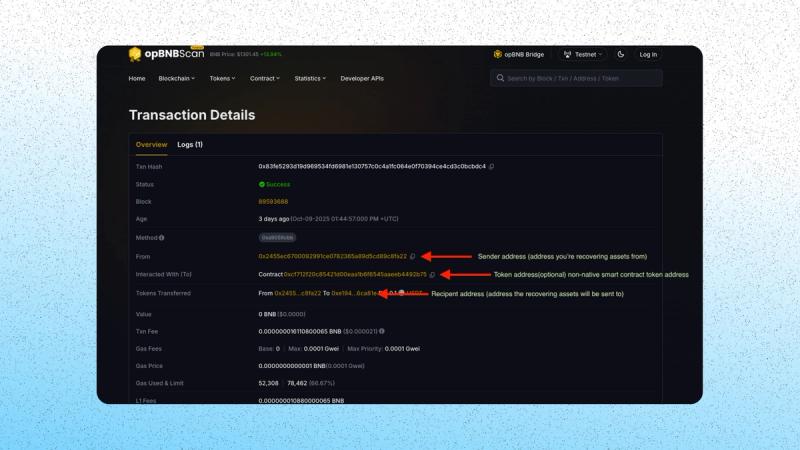
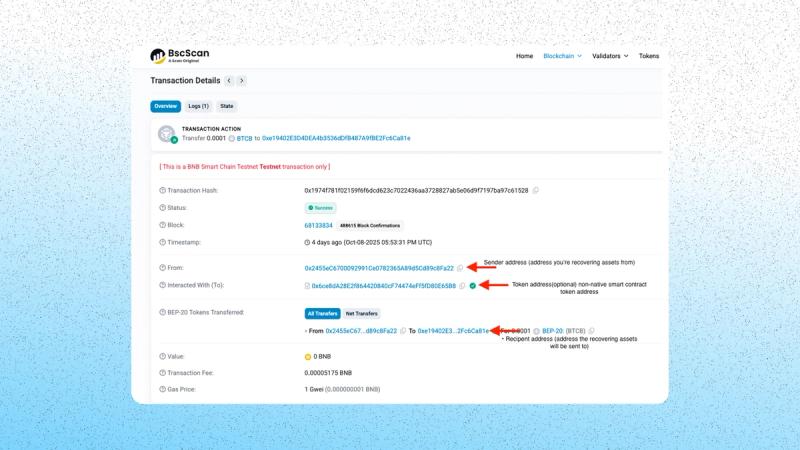
If you’re missing any of the required recovery data, you can obtain it using the transaction hash on the relevant blockchain explorer.
Search your transaction hash on the chain you mistakenly sent to, and note:
- The blockchain network used.
- The receiving address (your Blockradar address).
- The token contract address (for custom tokens).
- The amount transferred.
OpBNB custom token on the BNB chain
Bitcoin custom token on the BNB chain
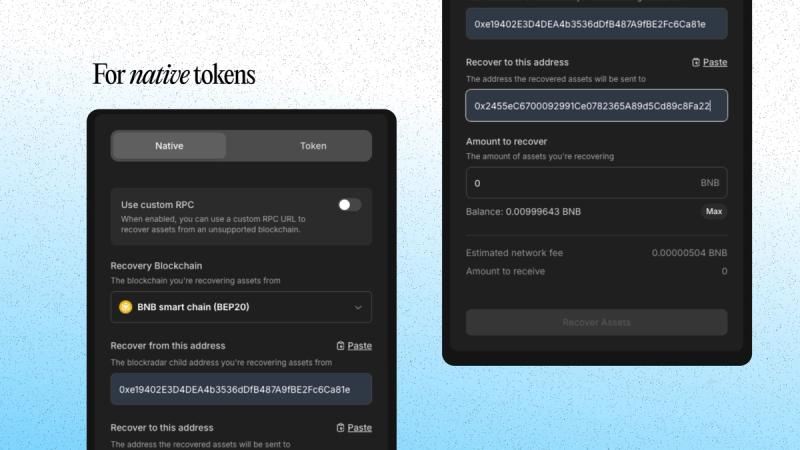
Step 2: Fill in Recovery Details on Blockradar dashboard
On your blockradar dashboard, fill in the required fields.For native tokens
For custom tokens
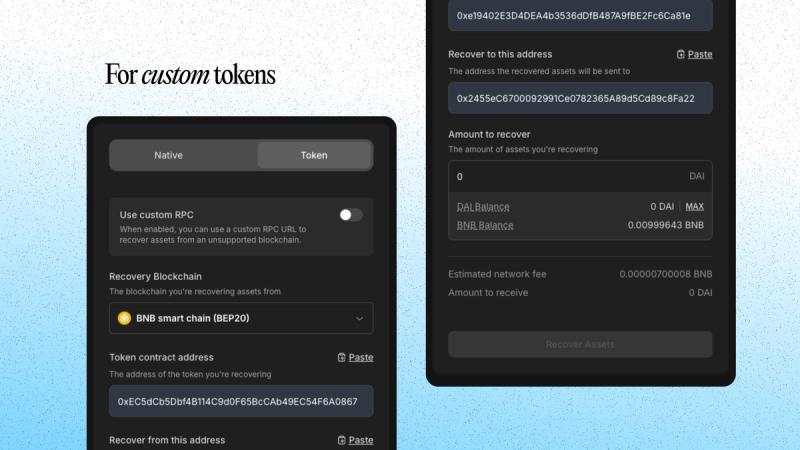
💡 Tip: Ensure your wallet has enough native token balance to cover gas fees for the recovery transaction.
Step 3: Submit Recovery
Click Recovery Assets.
Enter the OTP (One-Time Password) using your authenticator app.
Confirm the action.
Once completed, you can verify the recovered transaction by:
- Viewing the destination address on your wallet or dashboard, or
- Searching the address on the block explorer for the selected chain and checking the latest transaction hash.
Recovering Tokens Using a Custom RPC Endpoint or a layer 2 chain:
Sometimes, your lost assets may exist on a blockchain that isn’t officially supported on Blockradar. In such cases, you can recover them using a Custom RPC URL, and optionally enable Layer 2 mode for rollup-based networks.
Prerequisites:
In addition to the standard prerequisites above, you’ll also need:
An RPC Endpoint: Valid HTTPS RPC URL of the blockchain you’re recovering from. You canobtain free, privacy-first RPC endpoints from PublicNode.
Layer 2 Network (optional): Enable this toggle if you provided the RPC URL points to an L2 chain (e.g., Arbitrum, Optimism, Base).
Steps:
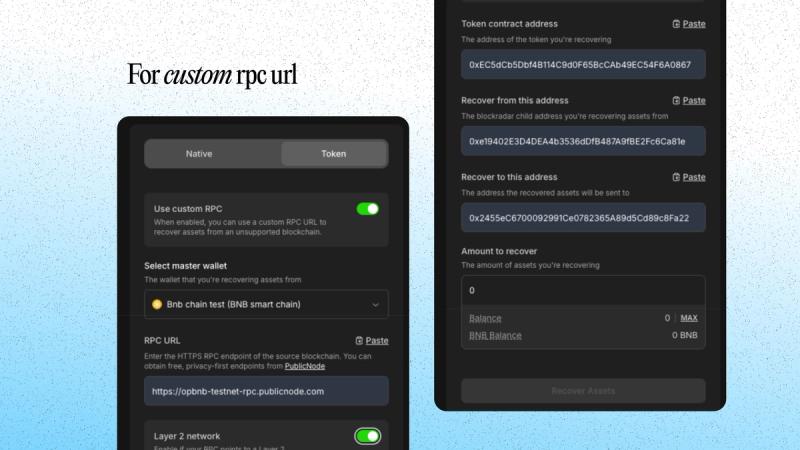
- Enable Use Custom RPC.
- Select the Master Wallet associated with your recovery address.
- Paste your RPC URL.
- (optional) Toggle Layer 2 Network if applicable.
- Fill in all other fields as described in the Recovering Native or Custom Token section.
- Click Recover Assets, Verify OTP, and confirm.
For custom rpc url
Recovering Tokens Using the Blockradar Recovery API
You can also Recover assets programmatically using the Asset Recovery API, which gives you programmatic access to the same functionality available in the dashboard. It is ideal for developers who want to build custom flows or integrate with backend systems.
There are two main endpoints that facilitate this.
Estimate network fee: It simply helps to calculate the estimated gas or fee required for recovery - POST /v1/wallets/{walletId}/salvage/network-fee
Initiate recovery: It performs the recovery POST /v1/wallets/{walletId}/salvage
Parameters Required
- walletId - Your Blockradar wallet ID (main wallet)
- blockchainId - The unique ID of the blockchain network the transaction was performed on
- senderAddress - The blockradar address holding the lost token
- recipientAddress - The address the token should be sent to
- amount - amount of the token to recover
- tokenAddress (for custom token) - Smart contract address of the token
- rpcUrl (optional) - The RPC endpoint for the unsupported network
- isL2 (optional) - indicates whether the RPC points to a Layer 2 chain
Step 1: Estimate the Network Fee.
Before initiating recovery, use the Network Fee endpoint to calculate the estimated cost for the transaction. https://docs.blockradar.co/api-reference/asset-recovery/salvage-network-fee
Example Request
curl --request POST \

--url "https://api.blockradar.co/v1/wallets/{walletId}/salvage/network-fee" \

--header "Content-Type: application/json" \

--header "x-api-key: <api-key>" \

--data '{

"amount": "2.5",

"blockchainId": "<BLOCKCHAIN_ID>",

"senderAddress": "0xYourBlockradarChild",

"recipientAddress": "0xRecipientAddress",

"tokenAddress": null

}'
Example Response
{

"data": {

"balance": "0.1",

"fee": "0.000021"

},

"message": "Salvage network fee fetched successfully",

"statusCode": 200

}
If recovering a token, include the contract address"tokenAddress": "0xTokenContractAddress"
Step 2: Perform the Asset Recovery.
After confirming the fee and available balance, call the Salvage endpoint to execute the recovery https://docs.blockradar.co/api-reference/asset-recovery/salvage
curl --request POST \

--url "https://api.blockradar.co/v1/wallets/{walletId}/salvage" \

--header "Content-Type: application/json" \

--header "x-api-key: <api-key>" \

--data '{

"amount": "2.5",

"blockchainId": "<BLOCKCHAIN_ID>",

"senderAddress": "0xYourBlockradarChild",

"recipientAddress": "0xRecipientAddress",

"tokenAddress": null

}'
Step 3: Monitor Recovery Status
Blockradar emit events for every transaction lifecycle:
- salvage.success
- salvage.failed
Summary:
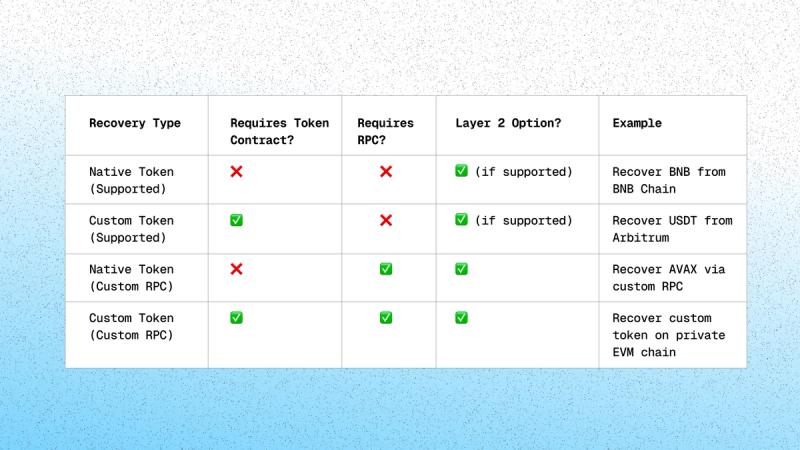
Wrapping up
Mistakes happen but with Blockradar, they do not have to be permanent. You can recover native assets and custom tokens on supported chains, and you can handle edge cases with a custom RPC when needed. The flow is simple. Confirm the details, estimate the fee, execute the recovery, and verify on chain.
If you get stuck
- Review the walletId, transaction hash, and the chain you sent to.
- Include the token contract address if it is a custom token.
- If you used a custom RPC, include the exact RPC URL and whether it is an L2.
Security notes
- Blockradar is non custodial. You control keys and policies.
- Every recovery is an on chain transaction that requires gas on the source chain.
- OTP is required for all recovery actions on the dashboard and API.
Build it into your product
- Estimate fee API: POST /v1/wallets/{walletId}/salvage/network-fee Docs: https://docs.blockradar.co/api-reference/asset-recovery/salvage-network-fee
- Recover assets API: POST /v1/wallets/{walletId}/salvage Docs: https://docs.blockradar.co/api-reference/asset-recovery/salvage
Ready to turn a bad send into a problem solved? Start a recovery in the dashboard or program the API into your flow today. If you need help with an unusual chain or a complex case, reach us and we will get you unblocked fast.
About Blockradar
Blockradar provides secure, developer-friendly stablecoin infrastructure for fintechs. Our non-custodial wallet APIs, transaction monitoring, and AML compliance tools make it easy to launch and scale stablecoin-powered financial services. From USDC and USDT payouts to onchain expense management, we help companies move money instantly and safely across borders—without building blockchain infrastructure in-house.
Blockradar is trusted by payment platforms, remittance providers, and Web3 startups building the future of finance.
Explore our API documentation and get started at https://blockradar.co